• Skip to main content
new-logo
  • Home
  • Blog
  • Products
    • Free App
    • Premium Service
    • B2B Products
  • FAQ
  • Contact
  • Company
    • Press Room

App

Understanding Push Notifications

Understanding Push Notifications

October 11, 2015 by Administrator

[This depends on your settings….but assuming your notifications are On…and set to make a sound]

If an alert is received for your primary route…

If you ARE logged in to the app:

  • If app is not running…you WILL get a push notification, with sound.
  • If app is running…but you are using a different app… you WILL get a push notification, with sound.
  • If app is running…and device screen is locked…you WILL get a push notification, with sound.
  • If app is running…and you are in (for example) Recent Alerts page…you WILL get the toast…but not the sound.

If you ARE NOT logged in to the app…you WILL NOT get push notifications.

Still having problems? Read our troubleshooting tip.


Filed Under: App

In case you want to test out sending a Clever Commute message

In case you want to test out sending a Clever Commute message

June 20, 2015 by Administrator

Here is how to create an alert which will test your account...but will NOT be visible in the app.

  1. Select the Participate menu option
  2. Set (1) What do you want to do to
    Send test message
  3. Ignore (2) What's happening?
  4. Ignore (3) What's the impact? 
  5. Ignore (4) Does this relate to a train? 
  6. Set (5) Tell us a bit more to
    I am a commuter doing a verification of my account
    ...and press Send.


    Do NOT use the word test in your alert.

Step 7. - Use the Contact feature of the website to let us know you did a test...and we'll let you know if we got it. 


Filed Under: App, documentation, Ops, techdoc

Spring – new beginnings

Spring – new beginnings

April 5, 2015 by Administrator

The one-liner: we are eliminating the old, free e-mail-based service…and replacing it with two options to receive your Clever Commute information.  [Note: It is indeed still possible to receive your alerts as e-mails].
—
A large number of Clever Commuters have cut over to use the new free app. It provides all the functionality of the old way…and we are thrilled to hear what people are saying about it.

Last month, we stopped supporting any new sign-up requests for the old e-mail based way.
As of April 30, we will no longer offer a free, e-mail-based solution. Commuters have two options:

  1. The free app – It works on iPhones, iPad, Android devices and even some Blackberries.
  2. Our premium service [The Inside Track] – It has all of the features of the old free service (including e-mail delivery)…as well as 30+ other incredible utilities.
    The current promotion is that the $39.99 annual price is reduced to $29.99 for the first year.
    There are actually 6 ways you can get it for free!

Over the last two months, as we mange the migration to the app, we have heard two key pieces of feedback:

  1. Some users want to continue to receive their information as e-mail
  2. Some users want to follow information on multiple train/bus lines

The Inside Track solves for both of these challenges…and SO much more. It gives you an e-mail experience which is worlds better than the old free service. Use our mobile web site to view data as well as set your delivery preferences. Messages are delivered faster and more-reliably. They also have the the alert in the subject line of the e-mail (you may not even need to open them!). The message body has an enhanced format for readability. Also, you can hide/block messages based on category (or sender).
You have full control over when you receive the messages (e.g., time-of-day, day-of-week). You can pause/resume/snooze your alert messages, as well. You can even elect to receive your messages as text messages.  Features vary by provider (e.g. LIRR vs NJT vs Metro North)…but you also get:

  • Track prediction / Track History – Use our algorithm to beat the crowds
  • Train performance metrics – How punctual is your evening train?
  • The ability to find trains which have been removed from the departure board – (Shhh…Did you know?)
  • See the geolocation of the alerts (shows each message on a map) and trains
  • And a daily Commuter Forecast for your evening commute

Final note: The Inside Track is not yet an app. However, we are in the process of moving all of the The Inside Track features into the app. Therefore, over the next few months, we’ll migrate functionality from the mobile web into the app…and it will be provide there as an in-app-purchase.

Filed Under: announcements, App

Regarding the “nickname” field in the app

Regarding the “nickname” field in the app

March 15, 2015 by Administrator

Overview: if you’d like to change the nickname you selected in your Clever Commute profile, please use the Contact option and let us know of the change. The request can be very simple. Example:
OLD: StevenBrinniker
NEW: EasyRider

More info:
When you signed up for Clever Commute, there is a note near the nickname field which lets you know that Clever Commute may share that handle with fellow commuters. A future enhancement to our app will show the nickname of the rider alongside the actual alert they sent. The exact layout is not finalized, but it will be something like this: “EasyRider: Signal problems at Secaucus are causing delays to NYP”

Therefore, if your current nickname exposes more info about your identity than you’d like, please use the steps above to request a change.

Reminder: your nickname must be between 5 and 13 characters in length. It can not

  • be offensive (e.g., profanity)
  • be confusing to commuters (e.g. “LIRR_Mgt”)
  • contain the word Clever
  • or otherwise unsuitable

Filed Under: announcements, App

Announcing The Clever Commute app: please spread the news…and vote for us

Announcing The Clever Commute app: please spread the news…and vote for us

February 13, 2015 by Administrator

Please

  1. Check out our new FREE apps for iPhone/iPad/Android
  2. Share the news / Share this post 
  3. Vote for us to win the MTA’s AppQuest app contest 

———

More info about the app:

  • All the features of our legacy e-mail approach…and we are still adding more bells and whistles
  • Yes – push notification
  • Lots of people are using it right now
  • Available in your app store…or learn more at clevercommute.com/app

More info about the Metropolitan Transit Authority’s (MTA) contest – AppQuest 

  • There is traditional / formal judging by a panel
  • There is also a Popular Choice category…and winning that would really help us get the word out
  • Please vote for us via this link

 For the visual folks:


Filed Under: announcements, App

The Free iOS Clever Commute App – Join the beta test

The Free iOS Clever Commute App – Join the beta test

January 30, 2015 by Administrator

You must be in the Clever Commute iOS beta program to install the iOS app.

Steps

  1. Ensure you are running iOS 8 or higher
    (iOS 8 is only needed for beta testing. All recent iOS versions will work when we go live)
  2. Use the Contact form of our website to let us know you want to join the beta test. We will then add you to the mailing list of beta testers.
  3. Install a free app from Apple called TestFlight. Wait for invitation from Clever Commute.
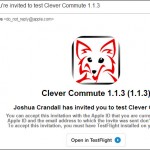
  4. The invite looks like this:

CleverCommuteTestFlightInstrux


Filed Under: App

  • « Go to Previous Page
  • Page 1
  • Page 2
  • Page 3
  • Page 4
  • Go to Next Page »

© 2006-2025 Clever Communicator, LLC. All Rights Reserved.