• Skip to main content
new-logo
  • Home
  • Blog
  • Products
    • Free App
    • Premium Service
    • B2B Products
  • FAQ
  • Contact
  • Company
    • Press Room

examples

Release Notes for Version 3.1.7

Release Notes for Version 3.1.7

April 8, 2018 by Administrator

Bug Fixes

  • Formatting of punctuation / special characters in Recent Alerts
  • Track Prediction fixes to ensure timeliness
  • Fixed a few issues with date widget on Snooze feature
  • Fixed a few issue for setting / changing Routes in Settings
  • Upgrade process of sending push notifications to Android users

New Features and Enhancements

  • First iteration of off-line capabilities have been added. More to come.
  • Added PABT feed for Lakeland Bus Route 78
  • Improved processing and output for NJT when trains are DELAYED/CANCELLED/STANDBY
  • UI improvements to accomodate Apple iPhone X

Infrastructure 

  • Modernized ad-serving platform
  • Enhanced routines to monitor and refresh GTFS data

Filed Under: examples Tagged With: releasenotes

Gremlins! A workaround for a sign-up bug

Gremlins! A workaround for a sign-up bug

February 7, 2018 by Administrator

Some users on some devices are experiencing a problem with the part of the sign-up process whereby you are prompted for information about your Route (primary/secondary/tertiary), Origin and Destination stations.
For some, the app does not show then the proper Provider (LIRR vs MetroNorth, etc) and therefore does not show the proper choices for their Origin and Destination.

We apologize for the problem. We have fixed both the Android and iOS versions of the app. The new version is called 3.1.5 and is available in the Apple App Store as well as Google Play

The workaround is to simply enter whatever you can at the Sign Up page…and then

  • Go to the main menu and press Settings
  • Select My Commute to update the values as you like
  • When you are done making your changes, please remember to scroll down and press Update at the bottom of the page.


Filed Under: examples

Release notes for version 3.1.1

Release notes for version 3.1.1

February 5, 2018 by Administrator

Bug Fixes

  • Ensure PM Track Voting get re-set each night
  • Hide “reverse commute” values for e-mails
  • Improve experience when there is no internet connection
  • Improve handing of certain emoji in Recent Alerts
  • Ensure days-of-history is properly stored and rendered on Track Prediction page
  • Un-set iOS badge after viewing Recent Alerts

Plus other technical improvements (certificates, instrumentation)


Filed Under: examples Tagged With: releasenotes

Release Notes for Version 3.1.0

Release Notes for Version 3.1.0

January 23, 2018 by Administrator

Bug Fixes and User-Facing Enhancements

  • App needs to handle (display) the apostrophe and quotation marks better
  • Push notifications are not going for some users
  • Show the version number of the app in the app

Technical work and Back-end Changes 

  • Upgrade of UI Framework
  • Ensure timeliness of GTFS
  • Improve usage metrics
  • Archive Framework for data
  • Apple X Verification
  • iOS Distribution refresh
  • Ensure Google Mobile Ads SDK at 7.0.0 or newer
  • Hygeine – Clean out the root of public_html

Filed Under: examples Tagged With: releasenotes

And this is why you want Clever Commute

And this is why you want Clever Commute

November 9, 2017 by Administrator

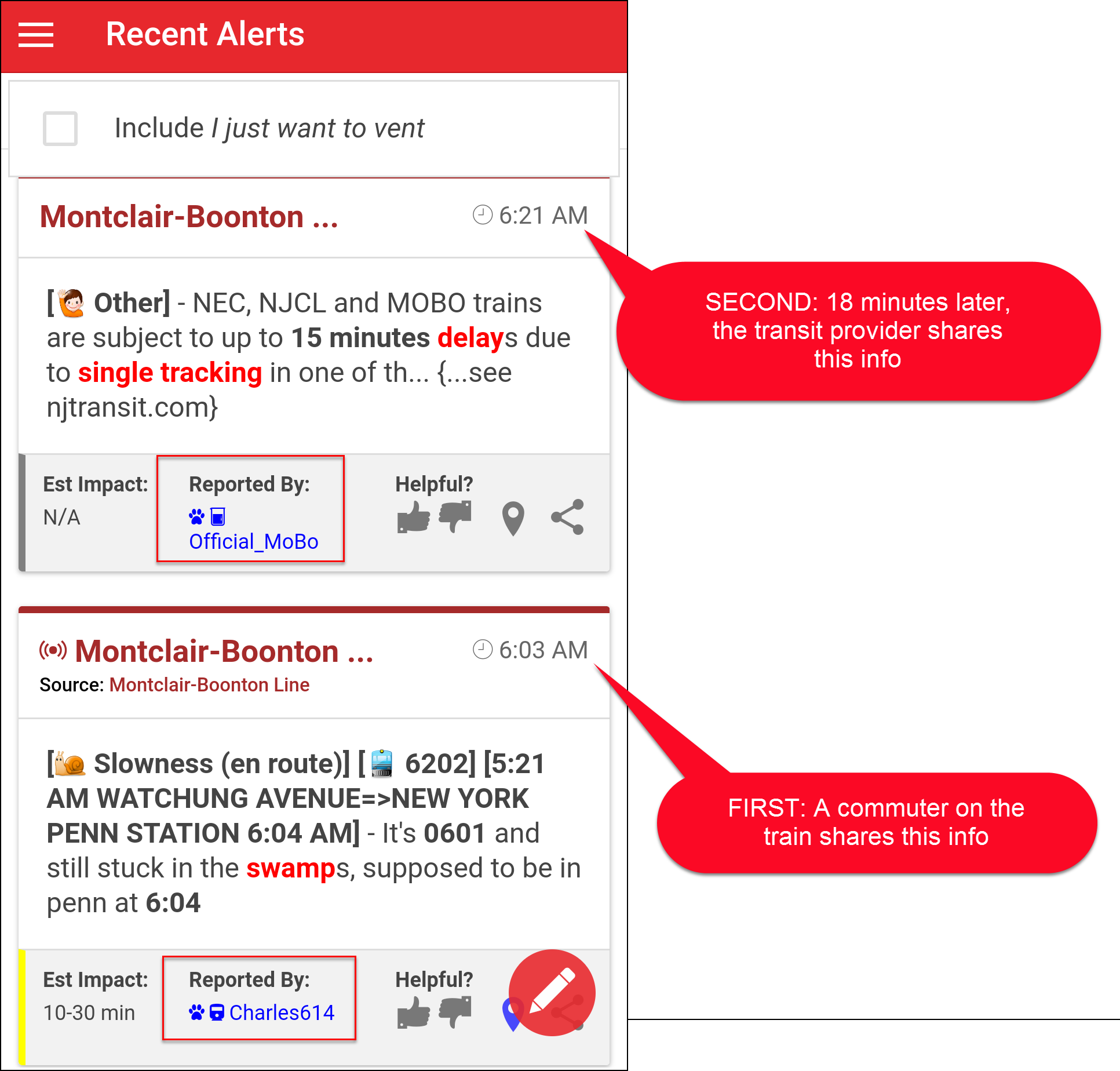
In the picture below, we added the yellow and greenish highlighting to show that the commuter RSW shared news a full 15 minutes earlier than the official alert. Click on the picture to get a closer look.

This kind of thing happens all the time on Clever Commute.


Filed Under: examples

Premium App Rebate Program

Premium App Rebate Program

September 13, 2017 by Administrator

Please read carefully.  Commuter action is needed at the end of their 1-month trial.  


The steps:

  1. Be sure you are running the latest version of the app (see clevercommute.com/releasenotes)
  2. Log out / Log in
  3. In the app, select the Premium option, and follow your app store's instructions to subscribe
  4. After 30 days, Apple or Google will charge your funding source (and send you a confirmation)
  5. Within 5 days of being charged, send us
    • A copy of the confirmation
    • The mailing address for the gift card (e.g. your home or your office)
      Within 10 days, we'll will send you $10 (iTunes gift card, PayPal or Venmo)

NOTES:

  • The e-mail address to send that to: feedback [at] clevercommute -dot- com
  • This deal may be route-specific (e.g., NJ Transit's Northeast Corridor Line or LIRR Port Jefferson Branch)
  • This offer is for new subscribers only

Filed Under: examples Tagged With: promo, rebate

  • « Go to Previous Page
  • Page 1
  • Interim pages omitted …
  • Page 4
  • Page 5
  • Page 6
  • Page 7
  • Page 8
  • Interim pages omitted …
  • Page 42
  • Go to Next Page »

© 2006-2026 Clever Communicator, LLC. All Rights Reserved.