
This is a write up of how to use one of the many features of the Clever Commute service. See also:
User-generated content is a very important part of Clever Commute. Here is information on how to send an alert.
Start here: Our best practices and how Clever is different from Twitter
Every member of the Clever Commute community who is in good standing is permitted and encouraged to share info with their fellow passengers. Start by opening the app, and selecting Participate from the main menu.
(1) What do you want to do? [Required] – Pick the most-suitable category for your alert. Most categories are straight-forward, but there are a few exceptions (Alert fellow passengers, I just want to vent, Provide Metrics, Send test Message).
(2) What’s happening? – Choose from the list
(3) What’s the impact? – If this Alert will cause a delay (to this train/bus…or to the overall system) then estimate the duration.
| (Click to see larger version)
| You are encouraged to populate 2 and 3. If you use the or let our robots decide option… …then our algorithm will populate these fields (based on the values provided on this alert) |
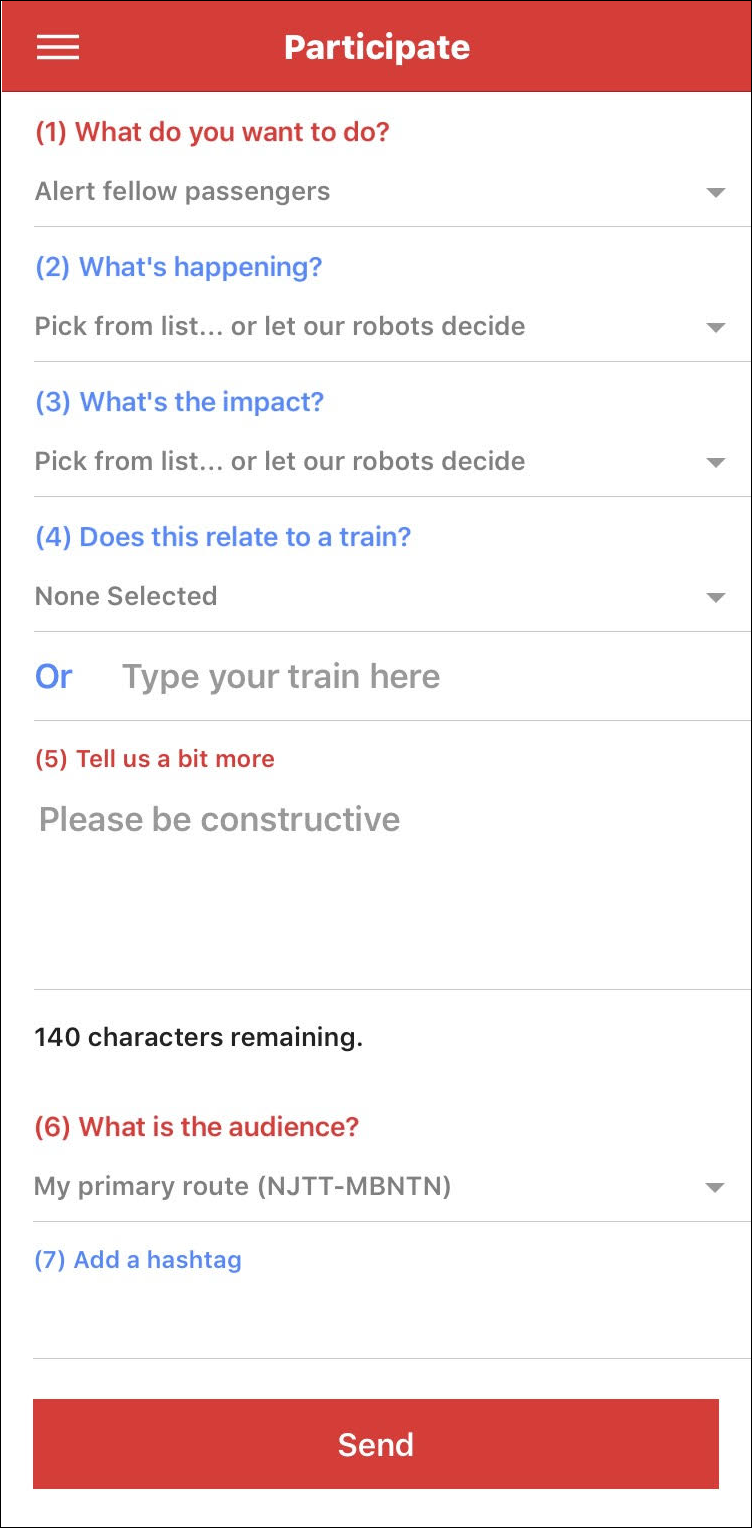
(4) Does this relate to a train? – Identify the train affected. Based on your My Commute settings (Origin, Destination, Primary route), and the time of day, the app queries official schedule data provided by NJT, LIRR and MNR to show you a list of relevant choices (more info).
That information is then shown as part of the published alert.
(Skip this field if you are on a bus.)
(5) Tell us a bit more [Required] – If you populated 1, 2, and 3, then you really don’t need to say much in this field (but you do need to say a few words).
Remember: the message is geo-tagged and timestamped, so you don’t need to add the where or the when
(6) What is the audience? [Required] – The vast majority of users will simply accept the default. Elevated users (AKA Rail Warriors) use this option to pick the most-suitable audience.
(7) Add a hashtag – Feel free to add a value if you like.
Overall: We encourage you to use the pick-from-list approach for the the fields above.
(5) – Tell us a bit more is really only there to enhance the rest of the alert. Please do not use that field to ask questions, or to be funny, snarky, etc, as this will cause your message to be held for review…resulting in a delay in getting the message to your fellow commuters.
Thank you for taking the time to read this and to pitch in. Maybe you’ll even show up on the Clever Commute Leaderboard!