
• Skip to main content
new-logo
  • Home
  • Blog
  • Products
    • Free App
    • Premium Service
    • B2B Products
  • FAQ
  • Contact
  • Company
    • Press Room

Inside Track

Premium e-mails are powerful, fast and easy to digest

Premium e-mails are powerful, fast and easy to digest

September 12, 2013 by Administrator

This page explains one or more of the dozens of amazing features found in Clever Commute Premium.

Depending on your commuting style, you can choose which Clever Commute product you use.

Our premium service provides a message structure which lets you simply browse your inbox to get the commuting headlines. (Click to enlarge)
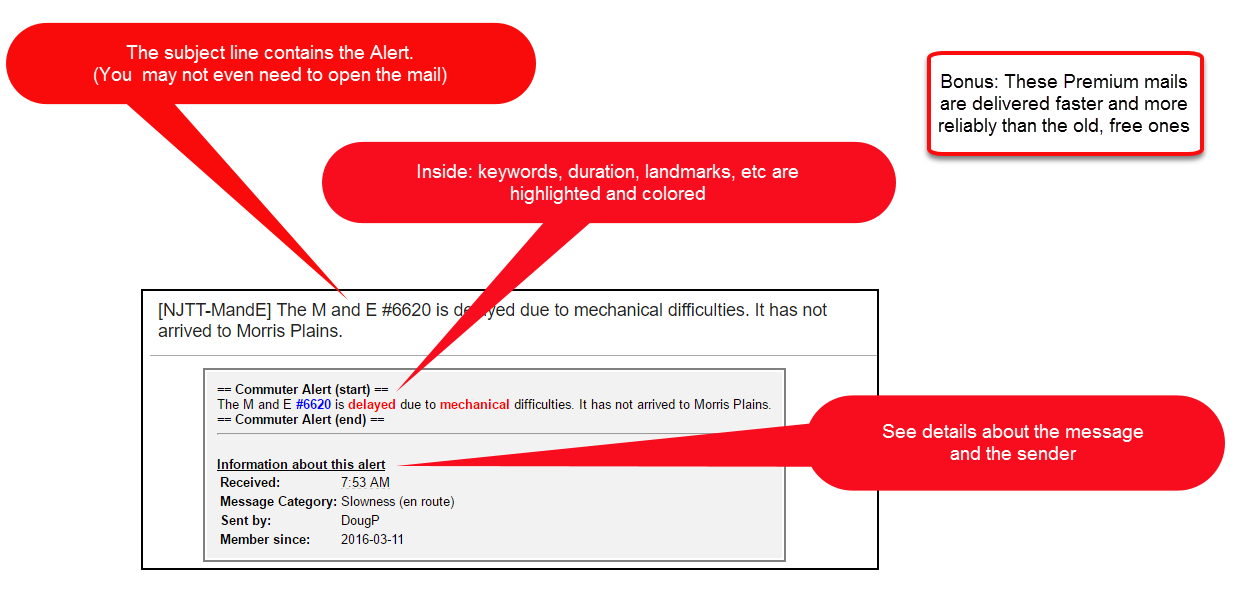
clevercommutepremiumemailview

Filed Under: Inside Track, ITFeatureWriteUp

Inside Track – Simple text message example

Inside Track – Simple text message example

September 12, 2013 by Administrator

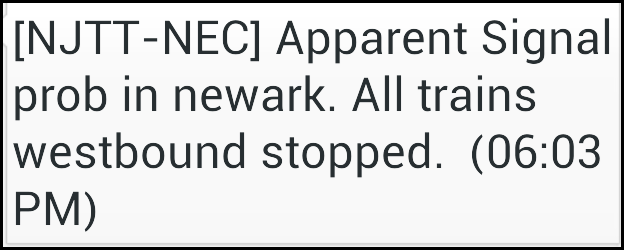
A picture is 1,000 words …so we figured we show you what you can expect if elect to have your information delivered as text message:

CleverCommuteTextMessageExample


Life’s simple pleasures, no?

Filed Under: Inside Track, ITFeatureWriteUp

More control of your notifications (over / under ‘x’ minutes)

More control of your notifications (over / under ‘x’ minutes)

September 11, 2013 by Administrator

Another new feature for Inside Track users!
They can now opt-in/opt-out of user-generated alerts for delays under 10 minutes.

How it works:

  • Clever Commute technology reads the text portion of alerts sent from our commuters.
  • If we can determine that the sender is indeed sending an “x minutes late” alert, Clever Commute will evaluate the duration of the stated delay…and then send/not send based on your stated preference.

How you set your preferences

  1. Log in to The Inside Track
  2. Use the gears / settings icon (top right) to find Show/Hide-categories
  3. Select / De-select these as desired
    • Delay (long) – to receive alerts on issues with stated impact of 10 minutes or less
    • Delay (short) – to receive alerts on issue with stated impact of 11 minutes or more

Due to the variety in the message styles, we can not guarantee 100% accuracy of this feature. However, our tests have shows it to be quite effective…and we will continue to monitor and revise as needed.

Filed Under: Inside Track, ITFeatureWriteUp

Clever Commute Rebate Programs – Instructions

Clever Commute Rebate Programs – Instructions

September 10, 2013 by Administrator

When we offer rebate promotions, here are the steps you need to follow:

  • Sign up at https://clevercommute.com/insidetrack
  • When you are prompted to pay, select the yearly (not monthly) option to start your 30-day free trial
  • After 30 days, PayPal will
    • charge your funding source
      (e.g., credit card, checking account, bank account, etc)
    • send you a notification that they did so
  • Within 5 days of being charged, send this to feedback [at] clevercommute -dot- com
    • The PayPal receipt
    • The name/code of the promotion which entitled you to the rebate
  • Within 5 business days of receiving that notification, Clever Commute issue the rebate (via PayPal)

Filed Under: Inside Track

How we help when there are LIRR “track changes at NY Penn” and NJT “single tracking”

How we help when there are LIRR “track changes at NY Penn” and NJT “single tracking”

September 6, 2013 by Administrator

The problem: Some widespread transit issues can be identified purely by technology (e.g., when 30% of NJT trains are listed as “STAND BY”). However, other issues benefit from user input. When “the latter” happens, we need a way to quickly publish/share the info with interested commuters.

The solution: Clever Commute technology will now “listen” for keywords which indicate that a known large problem is happening. When it does, The Inside Track will then automatically send a message to it’s subscribers.

To be clear: We will still depend on commuters to be the primary source of this info. Somebody must post the first alert to identify when these situations happen. The innovation here is that ALL in-scope commuters are now guaranteed to be notified…according to their preferences (text vs e-mail, time-of-day, day-of-week, etc)

Two examples of where we are putting this to work:

1. LIRR Track number changes at NY’s Penn Station – Seasoned commuters know that LIRR NYP track number assignments are fairly predictable. It’s not exact…but there is a pattern…or a cluster…and the commuters have a feel for what to expect.
However, the absence of finding trains on normal tracks can be a sign of system-wide problems (the problem may be in progress or on the horizon).  At a minimum, “track changes” requires heightened awareness on the part of the commuter.

2. Single-tracking into NY’s Penn Station – This appears to be more of a NJ Transit phenomenon…but may happen elsewhere. The scenario is that some type of “blockage” means that only 1 of 2 tracks are available for travel (usually) into or out of the city. Undeniably, a single-track situation creates delays.


Filed Under: Inside Track, LIRR, NJT

Geo-location and “categorized content” come to The Inside Track. [Quick-start guide]

Geo-location and “categorized content” come to The Inside Track. [Quick-start guide]

September 2, 2013 by Administrator

This week, we are sharing lots of exciting news about Clever Commute and The Inside Track.

But here are some tips and tricks for our faithful fans…so that you can get value from these new features right away.

First of all: Here is the #1 trick for “launching” The Inside Track the same way you “launch” an app from your phone’s home screen. Once you do this, you’ll understand the key reason we built The Inside Track for the mobile web (and not for iPhone, Andriod, etc).

Second: the two newest, coolest feature-families require you to use The Inside Track to reap the benefits: geo-location of the alert and categories of alerts.

We’ll document them more as we finalize and get your feedback (yes, we are always working to improve it). But here is the deal:

We all need to help each other by using the new “Share” feature of The Inside Track.
NOTE: Messages created “the old way” (via e-mail) will not have location-based info…nor will you you be able to attach a category to the message (more on that later). 

The new steps to share an alert:

(1) Login to Inside Track (https://clevercommute.com/insidetrack)
(2) Click on the “gears” icon at top right of the page
(3) Click on Share

The first time in, you will be asked to share your location information with Clever Commute. Of course, you can opt-out at any time…and still use our services.

However, it’s a karma thing: the enhanced info captured on that page (location and category) are the linchpins to the new value-added services…so please use them.

Key benefits / Why this is so cool: 

If you receive your alerts via e-mail, you now have an option to click through and see

  • the handle/shortname of the sender
  • the category of this message
  • [drum roll please] the location of the person at the time they shared that info

You can also browse the alerts/maps on your mobile device (just look at the Newsfeed feature of The Inside Track.)
Again: only messages created via The Inside Track will have this geo-location info. (Look for the map icon next to the messages to see which ones were created via The Inside Track “Share” page)

It’s especially cool that once you get familiar with the categories, you can use the Show/Hide-categories feature to further customize your experience. We’ll share more in on that soon.


Filed Under: Inside Track

  • « Go to Previous Page
  • Page 1
  • Interim pages omitted …
  • Page 6
  • Page 7
  • Page 8
  • Page 9
  • Page 10
  • Interim pages omitted …
  • Page 12
  • Go to Next Page »

© 2006-2026 Clever Communicator, LLC. All Rights Reserved.